The first answer is only the start
Most lawyers judge an AI tool by its first answer. If it is vague or slightly off, they close the window and do the work themselves. That misses where most of the value lies.
An AI tool is not a search box. It is closer to a very fast assistant that improves sharply when told exactly what was wrong. The people who save the most time rarely write a perfect first prompt. They know how to steer the second, third and fourth.
In an earlier article, AI Literacy for Lawyers: A Practical Framework for Safe, Effective Adoption, I set out the CLAIM framework (Context, Legal task, Audience, Instructions, Mode of output) for a strong first prompt and the rules that keep AI use safe. This article picks up where that one ended, with common mistakes, two worked examples, follow-up prompts and a small library of prompts to copy.
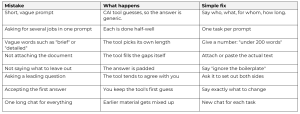
Seven common mistakes, and how to fix them
The mistake I see most often in training is the simplest: a short, vague prompt that does not say what is wanted. With nothing specified, the AI tool has to guess your intent, and it usually guesses wrong. Most of the habits below are versions of that problem.
Example 1: turning agreed advice into a client email
The situation. A senior associate has agreed the advice with the partner. It now goes to the client’s finance director, who has no legal background.
Weak prompt
Write an email to the client explaining this advice.
Strong prompt
Context: Below are my internal notes on advice already agreed with the partner. The client is [company] and the reader is its finance director, who has no legal background and will read this on a phone.
Task: Turn these notes into an email to the finance director.
Instructions:
– Do not add, remove or change any conclusion, risk or recommendation in my notes.
– If anything in my notes is unclear, list it at the end instead of filling the gap.
– Plain English, no jargon, no more than 250 words.
– Open with the decision the client needs to make and the deadline.
Output: A subject line, then the email, then a separate list headed “Points to check” for anything you were unsure about.
[Internal Notes: Confidentiality: this prompt uses real advice notes. Paste them only into an AI tool your firm has approved, and replace client names and identifying details with placeholders such as [Client] before you start.]
Why the strong prompt works
- It protects the substance. The tool’s job is the wording, so forbidding new conclusions stops it “improving” the advice.
- It writes for the real reader. A finance director on a phone needs the decision and the deadline first.
- It shows its doubts. The “Points to check” list tells the lawyer where to look before sending.
- It fixes the length. “No more than 250 words” works far better than “keep it short”.
Example 2: summarising a long document
The situation. A partner has a 60-page report and 15 minutes before a client meeting.
Weak prompt
Summarise this document.
Strong prompt
Context: The attached document is [describe the document]. We act for [client].
Task: Summarise it to prepare for a client meeting.
Audience: A partner who has 15 minutes to read it.
Instructions:
– Use only the attached document.
– Give a page number for every point.
– If the document is unclear or contradicts itself, say so.
– Keep the points and questions under 400 words (the table is extra)
Output:
1. The four most important points, with page numbers.
2. A table of every figure, date and deadline, with page numbers.
3. Two questions the partner may want to ask.
What a good answer looks like
Here is the kind of result it produces, using an illustrative report on a delayed project:
Key points
1. The project finished 14 weeks late (p. 4).
2. Most of the delay is blamed on late design approvals (pp. 18-22).
3. The revised cost on p. 31 does not match the summary on p. 6.
The document contradicts itself here.
4. A response is requested by 30 November (p. 45).
Figures and dates
| Item | Detail | Page |
| Total delay | 14 weeks | 4 |
| Revised cost | USD 2.4m | 31 |
| Summary cost | USD 2.1m | 6 |
| Response deadline | 30 November | 45 |
Questions for the partner
1. Which cost figure is correct, p. 6 or p. 31?
2. Who approved the designs, and when?
The partner can check the contradiction on pages 6 and 31 in under a minute. A general summary would probably have hidden it.
Why the strong prompt works
- It sets priorities. Knowing the reader has 15 minutes, the tool puts the key points first.
- Numbers get their own table. Figures and dates are where AI mistakes most often hide.
- It flags problems. Asking about contradictions stops a messy document from becoming a neat but misleading story.
The second prompt matters more than the first
Once you have a first answer, these follow-up prompts do most of the work.
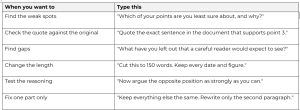
Two habits help. Say exactly what is wrong (“too formal”, “missing the payment date”) rather than “try again”. And say what to keep, or the tool may change it.
Ask neutral questions
AI tools tend to agree with whoever is asking. Ask “This clause is unfair to us, isn’t it?” and you will usually get a confident yes. Ask “Set out how this clause could work for and against each party” and you get something useful.
The same goes for your own drafts. “Is this letter clear?” invites praise. “List the three sentences most likely to be misunderstood” invites useful criticism.
Let the tool ask the questions
Not sure what to include? End your prompt with: “Before you start, ask me up to five questions about anything you need to know.” The tool will usually ask about the very gaps that would have spoiled the answer.
Break big jobs into steps
One long, complicated prompt produces an answer that is hard to check. Splitting the job into steps gives you a checkpoint after each one. For example, with a set of supply contracts:
- “From each contract, list the payment terms, notice periods and termination rights, with clause numbers.”
- “Put the results in one table and highlight where the contracts differ.”
- “Using only that table, draft a one-page summary of the differences for the partner.”
If step 1 is wrong, you catch it before it spreads.
A starter prompt library
Three prompts to copy, adapt and save. Square brackets show what to fill in.
Meeting notes
Below is a transcript of [meeting]. Produce: 1) decisions made, 2) actions in a table with owner and deadline, 3) open questions. Use only the transcript. Mark anything unclear as “unclear”.
A long email chain
Summarise this email chain in date order. For each step give the date, who said what, and any commitment made. Then list what is still unresolved. Under 300 words.
A tone check on your own draft
Read my draft letter below. Do not rewrite it. List any sentences that sound harsher, vaguer or more certain than I probably intend, and suggest a softer alternative for each.
Conclusion
Good results from AI depend less on a perfect first prompt than on steering what follows: say what is wrong, ask neutral questions, work in steps and keep the prompts that work.
The basic rules still apply: use approved tools, protect client information, check every reference and figure, and make sure a qualified person signs off. Within those rules, the second prompt is where most of the time is saved.